Letting Thousands of Concert-Goers In Without Reliable Internet
How we built an offline-first Android ticket scanner that decided every scan on the device and reconciled with the server later.
At a glance
A large concert series needed a way to check tickets at the gate. Every attendee carried a QR code, and volunteers at each gate scanned it on an Android phone. The catch was the venue itself: once thousands of people arrived, mobile data became close to useless.
We built an offline-first ticket scanner. Before the doors opened, each volunteer's phone downloaded the ticket list for its own gate. At the gate, every scan was checked against that local list and answered in place, with no network round trip required. Scan results were stored on the device and pushed to the server whenever a connection appeared, and the server settled any conflicts.
The system handled entry for a few thousand attendees across roughly 20 gates, with one phone per gate.
The problem
Most ticket scanners work like this: scan the code, send it to a server, and wait for a yes or no. That design assumes the network is always there. At a packed venue, it isn't. Thousands of phones in one place overload the nearby cell towers. Venue Wi-Fi, if it exists, usually isn't built for staff devices at every gate. The network fails at the worst possible moment, when the gates open and the queues are longest.
If every scan depends on the server, a network drop stops entry completely. Volunteers can't verify anyone, the queue backs up, and the choice comes down to two bad options: let people in unchecked, or keep them waiting outside.
So the real question wasn't how to validate a QR code. It was how to validate one correctly when the server can't be reached, and still end the night with an accurate, central record of who got in.
Constraints
- Assume no network. Every scan had to produce a correct answer without the network. Connectivity was a bonus, not a requirement.
- Answer at gate speed. A scan had to resolve in about the time it takes to hold up a phone. A spinner waiting on a timeout isn't acceptable when hundreds of people are queuing.
- Volunteer operators. The people scanning were volunteers, not technical staff. The app needed one obvious action (scan) and one clear outcome: valid, already used, or invalid. There could be no settings to get wrong on the day.
- One ticket, one entry. A screenshot of a valid code shouldn't admit two people.
- The server stays the record. The organisers needed a single, final count of who entered, including attempted re-entries, once the event was over.
- Ordinary phones. It had to run on everyday Android devices, not dedicated scanning hardware.
Architecture
The design turns the usual model around. The phone decides at the gate, and the server reconciles afterwards.
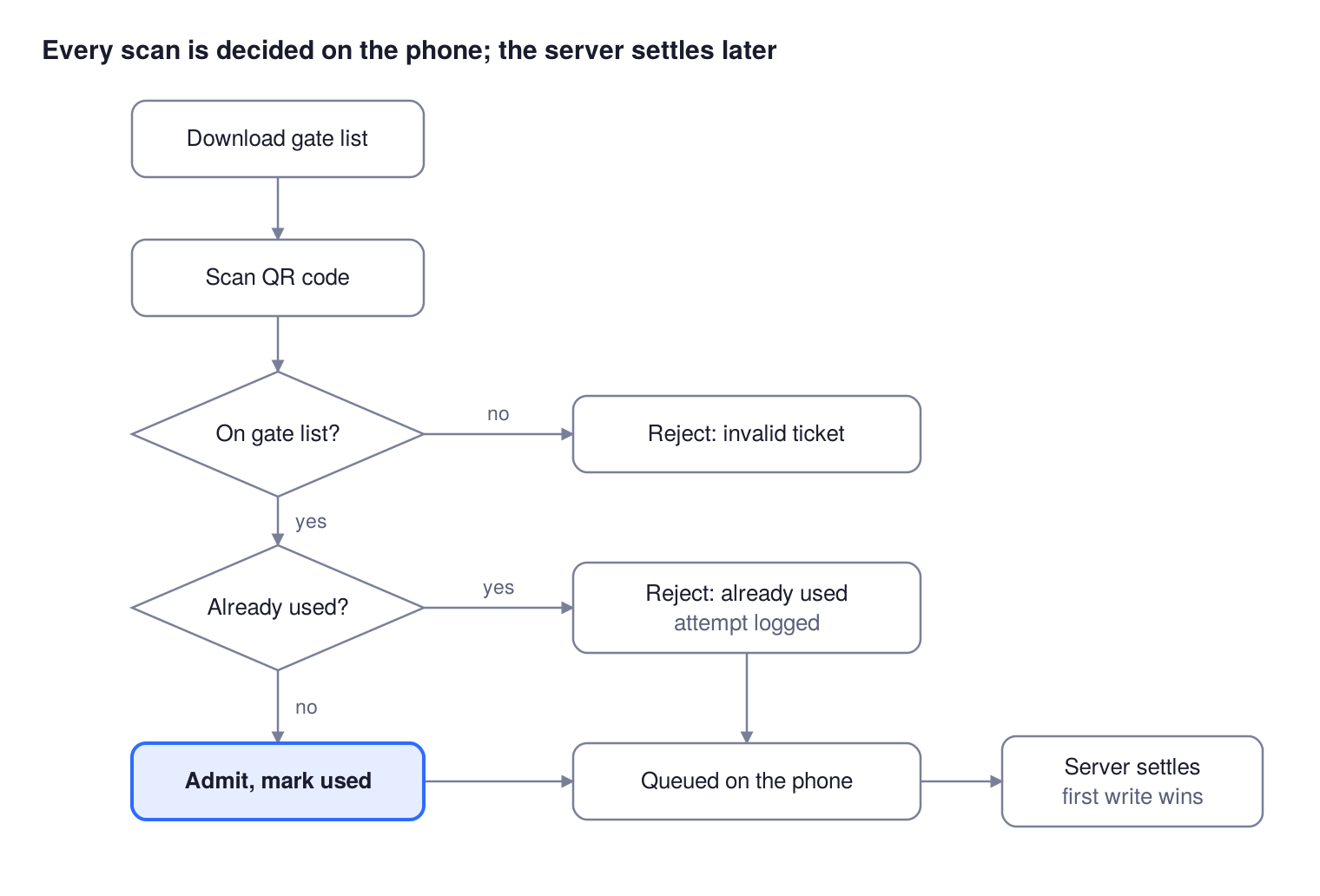
Every ticket gets one of three answers at the gate, and each answer is also queued so the server ends up with the full record.
1. Before the doors open: load the gate's list. Each volunteer signs in and is tied to one gate. The app downloads that gate's tickets from the server in pages and saves them to a local database on the phone. Each record holds the QR value, its status (unused or used), the gate it belongs to, a counter for repeat attempts, and a flag showing whether the server has seen the latest state. From then on the phone can make decisions with no network at all.
2. At the gate: decide locally. A scan is a lookup against the on-device list:
- Not in the list. The ticket is rejected. This covers forged codes and codes belonging to a different gate, since neither exists in this gate's data.
- In the list, already used. The ticket is rejected as a re-entry. The attempt counter goes up, so the organisers can see how often each ticket was tried again.
- In the list, unused. The phone marks the ticket used and shows a clear success screen.
When a connection happens to be available, the phone checks an unused ticket with the server before admitting it. That extra check catches the rare case where a ticket was already used somewhere the phone doesn't know about. Without a connection, the local answer stands.
3. Afterwards: sync opportunistically. Every local change is marked as pending. After each scan, if the phone is online, it sends all pending records to the server in one batch. A background job also retries on a schedule. On the server, the first recorded use of a ticket wins, and later uses are counted as duplicates. That gives the organisers one final record, even though the phones spent most of the night working independently.
Key decisions and trade-offs
Split the data by gate, not by event. Each phone downloaded only its own gate's tickets. This kept the local list small and quick to fetch before doors opened. It also meant a ticket could only be used at the gate it belonged to. Partitioning was the most important decision in the project, because it removed most of the ways two offline phones could each admit the same person. With one phone per gate, every ticket lived on exactly one device, so no two phones could ever approve the same ticket.
The list is the source of trust. We didn't try to prove a code was genuine through cryptography on the device. A code was valid only if the server had issued it to that gate ahead of time. Anything else, whether forged, mistyped, or meant for another gate, simply wasn't found. This is a simple rule, and it's easy to explain to a volunteer.
Record duplicates, don't just block them. A rejected re-entry still gets recorded. The phone increments an attempt counter and queues it for sync. That turned the scanner into a source of information too: the organisers could see which tickets were being passed around, not just how many people came in.
Sync rides on activity. Instead of relying only on a background schedule, the app tries to push pending results right after every scan. At a venue where connectivity flickers on and off, the moments when a scan happens are the moments someone is standing near the gate with a phone in hand. Short windows of signal get used as they appear, and a periodic background job is the safety net.
First write wins on the server. When records from several phones arrive, the earliest recorded use of a ticket is final, and anything after it counts as a duplicate. We picked this rule because it is predictable and easy to audit. It matches what happened physically at the gate: the first person through with that ticket got in.
Keep the operator's job tiny. The volunteer-facing app does three things: sign in, sync the gate list, and scan. The result screen uses colour plus a single word (successful, already used, or failed) that can be read at arm's length in a noisy queue. The scanner releases the camera as soon as a result appears, and it's ready again with one tap.
Results
The scanner handled entry for a few thousand attendees across roughly 20 gates. Each gate was staffed by one volunteer with one phone. Every gate moved about three to four guests per minute. Most of that time is the guest stepping up and holding out their code. The lookup itself runs against the phone's own database, so a dead network never stopped the line.
The gates kept moving while the venue's connectivity was at its worst. As phones came back online, their results synced to the server, and the organisers ended up with one reconciled record of entries and re-entry attempts for each ticket.
What we'd change next time
The core idea held up: decide locally, reconcile centrally. Looking back at the implementation, though, there are a few things we'd do differently.
Check whether the server is reachable, not whether a network exists. The app decided it was online when the phone had a Wi-Fi or mobile connection. At a crowded venue, a phone can show full signal and still move no data. In that state, the server check on an unused ticket can hang until it times out. A timeout is not a rejection. Next time, any server error other than a definite "already used" would fall straight back to the local decision, with a short timeout on that call so a guest never waits on the network.
Start background sync with the app, and let it retry properly. The periodic sync job was registered from outside events rather than when the app launched, and it reported success even when an upload failed. In practice, the sync after each scan did most of the work. A job that is registered at startup and returns a retry result on failure gets automatic backoff for free.
Make the write-back after sync precise. After a successful upload, the app rewrote the synced records from the batch it had read before sending. If a duplicate attempt was recorded while that upload was in flight, it could be overwritten. Updating only the synced flag, and only for records that haven't changed since they were read, closes that gap.
Scale beyond one phone per gate. We ran exactly one phone at each gate, and that is what made the gate split airtight. A bigger event would need several scanners per gate, and then the guarantee is gone: two phones holding the same list can both admit the same ticket while offline. We'd split each gate's list between its devices, or let phones at the same gate share results over a local network.
None of these changes the architecture. They are the details that separate a system that worked on the night from one you'd trust again without watching it.